
Claims Estimate Review Software: See What the Carrier Missed

Why the Estimate Gap Costs Claims Pros Real Money
TLDR Claims estimate review software spots what has been missed, so your supplements get paid. Picture a public adjuster at 9 p.m. with a 42 page insurer estimate open on one screen and their own supplement on the other. Two hours later they finally spot it. The carrier used an old price list and skipped the gutter detach and reset. That one miss is worth thousands, and it was found by tired eyes at the end of a long day.
If you work claims, you’ve had that night. And it matters to the homeowner more than most carriers admit. In the J.D. Power 2026 U.S. Property Claims Satisfaction Study, fairness of the settlement came out on top of everything people care about, and that was after surveying 5,093 homeowners. You can’t get to a fair settlement from a bad estimate. That’s the whole reason this kind of software exists.
What Is Claims Estimate Review Software?
Claims estimate review software analyzes property insurance estimates, such as Xactimate files, line by line. You give it the carrier’s estimate and your own estimate or supplement. It lines them up, points out what’s missing or priced too low, and keeps a record of the difference you can take into a negotiation or an appraisal.
Think of it this way. Xactimate, built by Verisk, is where estimates get written. Review software is where somebody finally checks them. It’s also not the same thing as the quality tools carriers run on their own adjusters. Those are there to protect the insurer. This is there to protect your client’s recovery.
What Gets Missed in an Insurance Estimate

Most underpaid claims aren’t one giant mistake. It’s usually five or six small ones nobody caught. These are the spots a seasoned reviewer looks at first.
Overhead and Profit
Overhead and profit, or O&P, is the markup that pays a general contractor for running the job and making a living when more than one trade is involved. It’s also one of the biggest fights in property claims. Some carriers leave it off and wait to see if anyone asks, and the rules shift depending on the carrier, the policy, and the state.
So if your roof job also needs gutters, siding, and interior paint, and there’s no O&P anywhere on the carrier’s estimate, that’s worth a second look. Good review software flags it for you.
Price List Date and Region
Every Xactimate estimate pulls its prices from a regional price list. According to Verisk’s pricing data services page, those lists get updated every month for more than 460 regions across the US and Canada, based on local market research.
Here’s the catch. Build an estimate on last spring’s list, or on the wrong region, and dozens of unit prices come out a little low. Nobody notices one at a time. Review software notices all of them at once.
Code Upgrades and Ordinance or Law
Local building codes often require work the original structure never had, like added underlayment or updated electrical. Many jurisdictions base those rules on the International Residential Code from the International Code Council. Carriers sometimes leave this work out of the first estimate.
Whether code work gets paid depends on the policy, usually through ordinance or law coverage. That is why estimate review works best next to policy review. A tool like Adjusted’s Policy Analyzer helps you confirm coverage before you build the supplement.
Depreciation and Detach and Reset
Depreciation is the part of the payment the carrier holds back until the work is done. You can usually get recoverable depreciation back later, but only if it was figured right to begin with. So check every line. Is it too steep? Is it showing up on labor or items that shouldn’t be depreciated at all?
Detach and reset is another common miss. Think gutters, satellite dishes, light fixtures, and solar panels that have to come down and go back up during the repair. Leave those lines off and the contractor ends up doing that labor for free.
How Claims Estimate Review Software Works, Step by Step
Here is the workflow most claims teams follow, with or without software:
- Gather both estimates. Collect the carrier’s estimate and your own estimate or supplement, plus photos and notes.
- Upload the files. Good software reads Xactimate formats directly, so nothing gets retyped.
- Match line items. The tool lines up items by room, trade, and description.
- Flag variances. Missing lines, quantity gaps, and price differences get highlighted.
- Check the policy. Confirm that each flagged item is actually covered.
- Build the supplement. Turn the flagged items into a clear, documented request.
- Keep the record. Store the report with the claim file for negotiation or appraisal.
Adjusted’s Estimate Analyzer takes care of steps two through four for you. It reads Xactimate formats natively and uses AI to compare the initial and supplement estimates line by line. One Adjusted user, Jim B., said variance reports that used to eat half his day now show up instantly.
Manual Review vs. Standalone Tools vs. a Claims Platform
Not every review method fits every team. This table shows how the three common options compare.
| Factor | Manual Review | Standalone Review Tool | Claims Platform with Review Built In |
| Time per estimate | Hours | Minutes | Minutes |
| Line by line comparison | By eye | Automated | Automated |
| Policy coverage check | Separate step | Usually not included | Included |
| Claim documents in one place | No | No | Yes |
| Billing and time tied to the claim | No | No | Yes |
| Best fit | A few claims a month | One specific job | Busy firms juggling lots of open claims |
A standalone tool is fine if all you need is a supplement letter. The trouble starts when the estimate sits in one app, the policy in another, the photos in a shared drive, and the invoice in QuickBooks. That’s how things get lost. Keeping the review inside the claim file means everything you need for the next phone call is already in one spot.
Estimate Review by Role
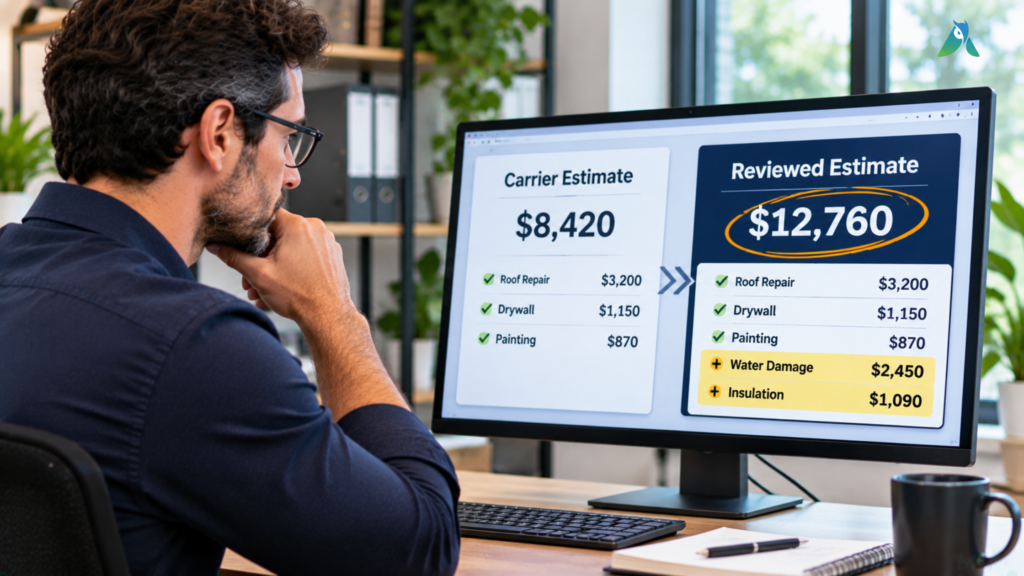
Each type of claims professional uses estimate review a little differently. Here is how it fits each role.
Public Adjusters
Public adjusters represent the policyholder, so every missed line item comes straight out of their client’s recovery and their own fee. The National Association of Public Insurance Adjusters is a good starting point for the professional standards PAs work under.
For a PA, review software means more claims handled per adjuster without cutting corners. It also means every number in the negotiation has a documented source.
Restoration Contractors
Contractors need the supplement approved before the job loses money. Review software shows exactly where the carrier’s scope falls short of the real work, so supplements go in with proof instead of argument.
If paperwork is your bigger headache, our guide on automated claims processing shows how to get claim files under control.
Claims Attorneys
For first party property attorneys, a clean variance report is evidence. You get every disputed item, what it’s worth, and why, laid out on a page you can hand to an appraiser or attach to a filing.
It’s also a quick way to size up a new case. Run the numbers early and you’ll know whether the gap between what the carrier paid and what the repairs really cost is big enough to fight over.
Can AI Really Review an Insurance Estimate?
Yes, for the grunt work. AI can read a 60 page estimate in seconds, match up thousands of line items, and catch the pattern you’d miss at 9 p.m. What it can’t do is make your calls for you. That’s still your job, and honestly, it should be. AI flags it, and you decide.
Security matters too, because claim files carry sensitive homeowner data. Adjusted holds SOC 2 Type II certification, so an outside CPA firm has actually tested its security controls, not just read a policy about them.
What to Look For Before You Pick a Tool
Ask any vendor to show you these on a real file, not a slide:
- Reads Xactimate files directly, with no retyping
- Compares estimates line by line and shows clear variances
- Connects the estimate to the policy and its coverage
- Keeps photos, notes, and reports inside the claim file
- Shows a clear audit trail for every change
- Protects data with proven security standards
FAQs
What estimating software do insurance companies use?
Most US property carriers use Xactimate from Verisk. Some also use Symbility, which is now part of Cotality. That is why review software that reads Xactimate formats is so useful.
What is a supplement in insurance?
It’s basically asking the carrier for more money on a claim that’s already open. Maybe the first estimate missed some damage, or the repair turned up something nobody could see during the inspection. Either way, you’ll need photos and line item backup to get it approved.
How long does estimate review take?
By hand, comparing two large estimates can take hours. With claims estimate review software, the comparison itself takes minutes, and your time goes into judgment calls instead of searching.
Can estimate review help with the appraisal clause?
Absolutely. Once a dispute heads to appraisal, both sides need to know exactly which items they disagree on and by how much. A variance report hands that to them on day one.
Does claims estimate review software replace Xactimate?
Nope. You’ll keep writing estimates in Xactimate like you always have. The review tool just reads those files, compares them, and tells you where the numbers don’t match, which leaves you more time to actually negotiate.
Is claims estimate review software worth it for a small firm?
For most firms, yes. If a review finds even one missed line item worth a few hundred dollars on each claim, the software usually pays for itself within the first handful of files.
Bottom Line
Every estimate you review by hand is a chance for a costly line item to slip past you. Claims estimate review software turns hours of side by side checking into minutes and gives you proof for every dollar you ask for.
Got a carrier estimate on your desk right now? Bring it to your Adjusted demo and we’ll run the comparison live, so you can see what it finds on your own file. And if it’s not for you, there’s a 30 day money back guarantee.
